Moonbase Mac mini AI Command Deck: architecture and spatial workspace design
By Andy Herman
1. Scope and architectural motivation
Earlier releases of Moonbase explored two distinct models for a personal agent workspace: a walkable 3D lunar habitat with read-only process telemetry (Building Moonbase), and a server-owned 2D control plane built around versioned SDK profiles, workstreams, and explicit consent gates (Persistent Agent Workbench and its technical specification).
While the SDK control plane enforced strong isolation guarantees, it introduced two practical failure modes for daily single-owner use on an always-on Mac mini:
- Duplicate runtime and authentication friction: Consumer desktop subscriptions (
Claude.appandGitHub Copilot.app) cannot be freely re-hosted inside third-party SDK harnesses, leaving the SDK-backed Claude route permanentlyauth-blockedwhile the native desktop apps were already signed in and running on the same host. - Spatial occlusion in the 3D loft: The original upstairs Flight Director office (
8m x 5m) suffered from third-person camera collisions against the surrounding glass and south walls, off-center desk monitors, and a hardcoded October seasonal hand mesh (warlockHand) that rendered green zombie claws in first-person mode.
The October 17, 2026 release (PR #20 and PR #22, deployed on https://moonbase.neural-bridge.dev) resolves both issues by turning the upstairs Flight Director office into a direct remote portal for the live Mac mini host and binding the downstairs mini dinosaur agents to real local session logs. The companion narrative article (Moonbase: Back to the Drawing Board) covers the product rationale; this paper documents the exact runtime contracts, spatial math, and Blender asset pipelines.
2. System boundary and end-to-end architecture
Moonbase continues to run as a single-tenant Node and TypeScript service on the Mac mini (127.0.0.1:47831), fronted by Cloudflare Access and Moonbase session authentication (/login Airlock). The new Command Deck subsystems operate strictly behind authenticated session middleware.
| Subsystem | Source module | Responsibility |
|---|---|---|
| Upstairs Mac mini Mirror | src/server/mac-mirror.ts, src/client/ui/mac-mirror.ts | Window discovery (CGWindowListCopyWindowInfo), JPEG frame capture (screencapture), 50 KB backing-store validation, SVG status fallback, and click/keystroke injection. |
| Downstairs Live Session Watcher | src/server/live-session-watcher.ts, src/client/ui/live-session-modal.ts | Non-intrusive JSONL tailing of ~/.copilot/session-state and ~/.claude/projects, state classification (working, waiting, idle), and deterministic mapping to downstairs desks 0..5. |
| Flight Director Loft and Camera Physics | src/client/world/office.ts, src/client/main.ts, src/client/world/hands.ts | Expanded 9.0m x 7.2m x 3.3m upstairs loft, automatic upper-enclosure cutaway (setLoftCutaway), eye-level First-Person View (shortcut C), and sculpted dinosaur paws (dino-paw.glb). |
| Procedural Blender Desk Assets | scripts/blender/build_desk_assets.py, scripts/blender/build_dino_hands.py | Reproducible Python-driven Blender 4.2 asset generation for mac-mini.glb, desk-keyboard-mouse.glb, digital-photo-frame.glb, desk-companion-kit.glb, and dino-paw.glb. |
| Virtual Rotating Photo Frame | src/server/photo-frame.ts, src/client/ui/photo-frame.ts | Local photo directory scanner (~/Pictures, ~/Desktop, etc.) plus browser-folder upload (webkitdirectory), path-traversal guard, procedural Lunar Base SVG generator, and live 3D CanvasTexture slideshow. |
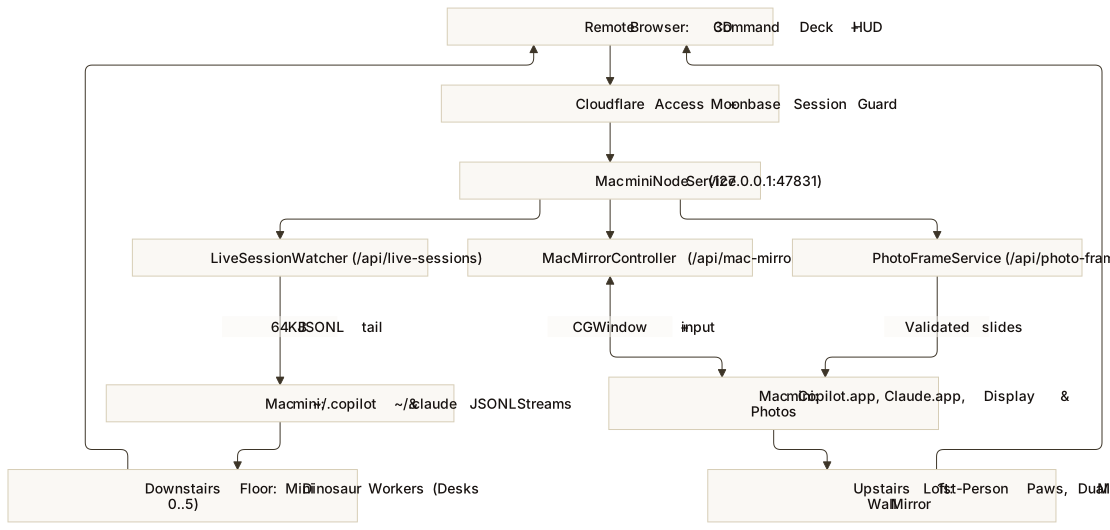
3. Upstairs Mac mini Mirror (src/server/mac-mirror.ts)
The Upstairs Flight Director Office provides three interactive monitors, each bound to a MacMirrorTargetId (copilot, claude, or desktop):
- Left Desk Monitor (
copilot): TargetsGitHub Copilot(bundleId: com.github.Copilot, process matchGitHub Copilot). - Right Desk Monitor (
claude): TargetsClaude Desktop(bundleId: com.anthropic.claudefordesktop, process matchClaude). - South-Wall Ultrawide Monitor (
desktop): Targets the full Mac mini primary display (screencapture -x -t jpg).
Window discovery and minimum backing-store check
When /api/mac-mirror/frame?target=<id> is requested with live capture enabled (MOONBASE_MAC_MIRROR_LIVE=1), MacMirrorController enumerates on-screen windows via CoreGraphics (CGWindowListCopyWindowInfo(kCGWindowListOptionOnScreenOnly, kCGNullWindowID)) to locate the largest visible window (width > 200, height > 150, layer === 0) belonging to the target application.
A subtle macOS behavior occurs when an application window is minimized, hidden behind another fullscreen space, or occluded: screencapture -x -l <windowId> can return a valid JPEG header containing an empty or solid-color backing store. To prevent the upstairs monitors from displaying blank white rectangles, captureFrame enforces a 50 KB minimum frame threshold (buf.length > 50_000) for application windows (15 KB for full desktop captures). If the captured buffer falls below that threshold or macOS Screen Recording permission is unavailable, the server returns a high-contrast 1440x900 SVG status preview card with live process telemetry and a one-click Bring to Front on Mac mini action (POST /api/mac-mirror/activate).
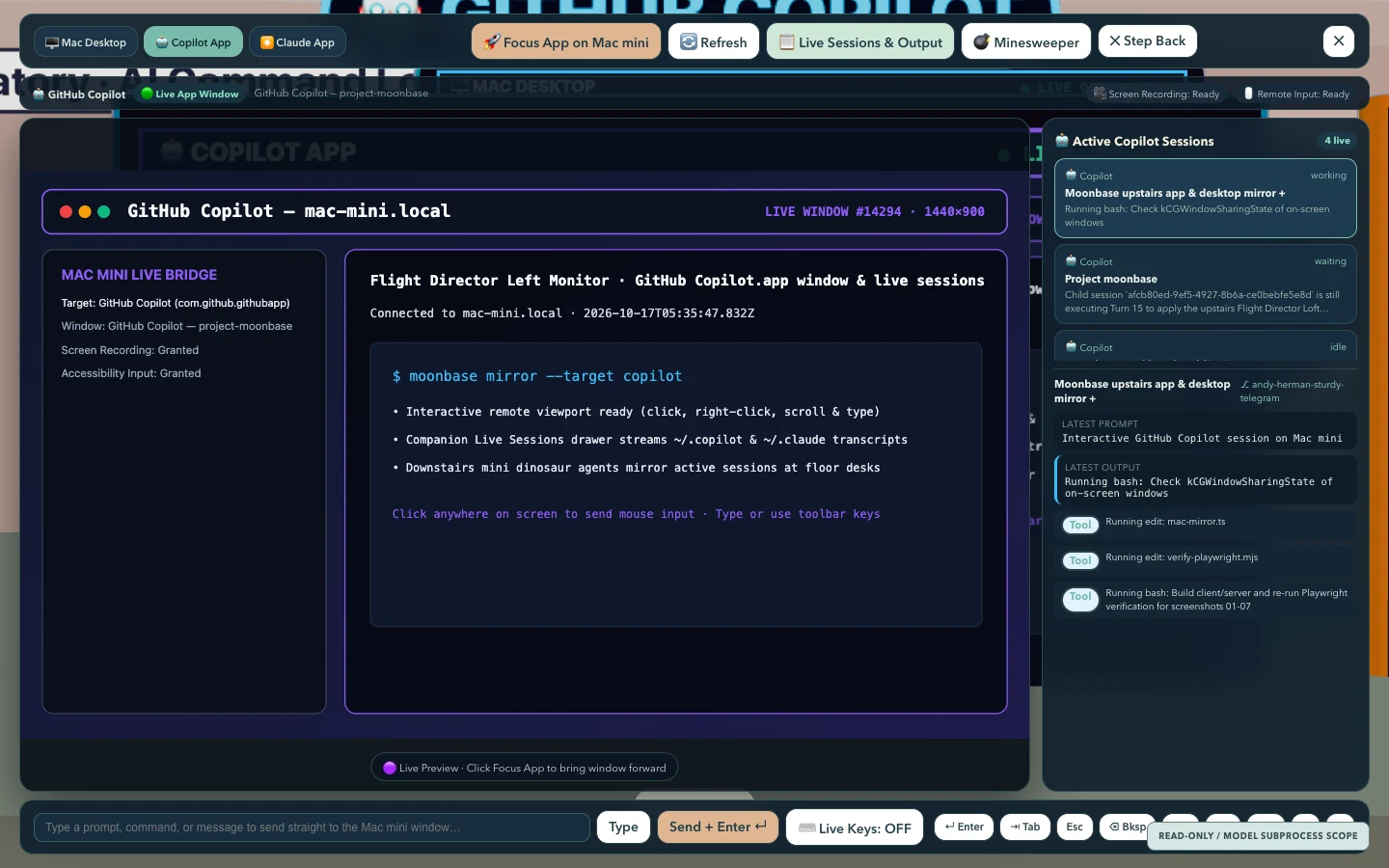
src/client/ui/mac-mirror.ts), showing the 1440x900 status preview card, normalized click and keyboard forwarding toolbar, and Step Back control. Open full size.Remote input forwarding
The zoomed monitor modal (src/client/ui/mac-mirror.ts) supports two remote interaction primitives over POST /api/mac-mirror/input:
- Normalized coordinate click forwarding (
type: "click"): The browser computes normalized coordinates(x, y)in[0, 1]across the rendered monitor surface. On the server,sendInputactivates the target application viaosascriptand dispatches a CoreGraphics mouse event (kCGEventLeftMouseDown/kCGEventLeftMouseUp) or AppleScript click at the corresponding screen coordinates. - Keyboard text injection (
type: "text"ortype: "key"): Text strings are sanitized and forwarded to the active application viaSystem Events(keystrokeandkey codeforEnter,Tab,Escape, andBackspace), enabling prompt entry and approval confirmation from a remote browser.
4. Downstairs Live Session Watcher (src/server/live-session-watcher.ts)
Instead of requiring tasks to be launched inside Moonbase’s own SDK harness, LiveSessionWatcher observes the sessions and background sub-agents that the owner spins up natively inside GitHub Copilot and Claude Desktop / Claude Code.
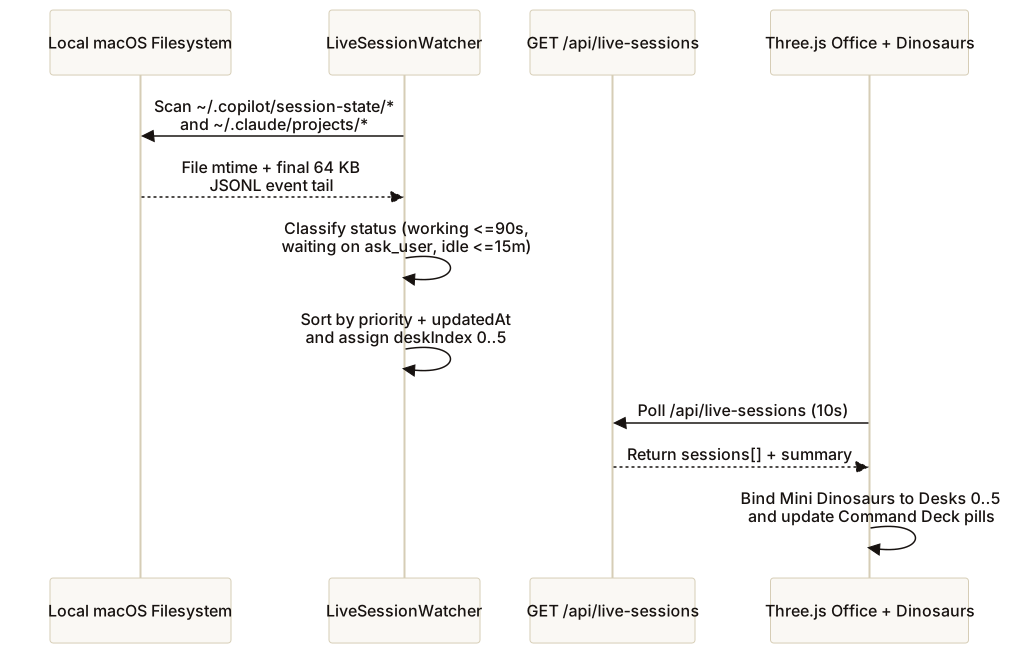
Event-stream classification rules
LiveSessionWatcher reads only workspace.yaml metadata and the final 64 KB tail of each events.jsonl (Copilot) or project .jsonl (Claude) file. It never writes to session directories, locks SQLite databases, or spawns CLI subprocesses:
- GitHub Copilot sessions (
~/.copilot/session-state/<uuid>/):- Parses
workspace.yamlforsummary,repository,branch, andcwd. - Inspects the tail of
events.jsonl. If the final events contain an unresolvedask_userorexit_plan_modetool request, the session is markedwaiting. IfageMs <= 90_000with active tool or turn execution (orageMs <= 25_000mid-stream), it is markedworking. Sessions updated within15 minutesare markedidle.
- Parses
- Claude sessions (
~/.claude/projects/<project>/<session>.jsonl):- Extracts the workspace slug, recent user prompt, assistant text snippet, and active
tool_useblocks. - Marks the session
workingwhen modified within45 seconds(or90 secondswith an in-flighttool_useblock) andidleup to15 minutes.
- Extracts the workspace slug, recent user prompt, assistant text snippet, and active
- Deterministic desk binding: Discovered sessions are sorted by state priority (
workingthenwaitingthenidle) and recency (updatedAt), and the top six sessions are assigneddeskIndex: 0..5. On the Three.js floor, each assigned desk spawns or updates a mini alien-dinosaur worker carrying a floating badge with the real session title, source (CopilotorClaude), and live activity dot. Clicking either the 3D dinosaur or its top-bar pill openssrc/client/ui/live-session-modal.tswith the parsed transcript tail (GET /api/live-sessions/:id/output).
5. Spatial ergonomics, loft expansion, and First-Person View
The most visible usability failure of the earlier 3D room was spatial cramping in the upstairs office. In the original coordinate system, the Flight Director loft occupied only 8m x 5m (x: 10..18, z: 8..13, y: 3.0, height: 2.5m). When the camera orbited behind the avatar in third-person mode, the loft’s upper glass partition and banners intercepted the camera ray or filled the viewport.
Loft coordinate expansion and automatic enclosure cutaway
In src/shared/layout.ts and src/client/world/office.ts, LOFT was expanded to a 9.0m x 7.2m x 3.3m elevated deck (x: 9.0..18.0, z: 5.8..13.0, y: 3.0) with a centered 3.8m x 1.32m executive workstation at (13.5, 3.0, 10.15):
| Spatial element | World coordinates (x, y, z) | Dimensions / orientation |
|---|---|---|
Expanded Loft Floor (LOFT) | x: 9.0..18.0, y: 3.0, z: 5.8..13.0 | 9.0m wide x 7.2m deep x 3.3m tall elevated deck |
| Flight Director Asset Desk | (13.50, 3.00, 10.15) | 3.80m wide x 1.32m deep executive desk |
Left Desk Monitor (GitHub Copilot) | (14.06, 4.11, 10.33) | Centered left (offsetX = +0.56 facing south), angled -0.06 rad |
Right Desk Monitor (Claude Desktop) | (12.94, 4.11, 10.33) | Centered right (offsetX = -0.56 facing south), angled +0.06 rad |
Keyboard & Mouse (desk-keyboard-mouse.glb) | (13.50, 3.83, 9.87) | Centered in front of dual monitors |
Mac mini M4 (mac-mini.glb) | (14.84, 3.83, 10.27) | Left desk wing (offsetX = +1.34), angled -0.14 rad |
Digital Photo Frame (digital-photo-frame.glb) | (12.14, 3.83, 10.11) | Right desk wing (offsetX = -1.36), angled +0.22 rad |
Studio Companion Kit (desk-companion-kit.glb) | (15.06, 3.83, 9.87) | Left desk corner (offsetX = +1.56), angled -0.25 rad |
Huge South-Wall Monitor (Mac mini Desktop) | (13.50, 4.92, 12.92) | 3.66m wide x 1.98m tall wall display facing north (ry = PI) |
The upper glass panes and banner above the 0.92m safety railing on the north and west loft edges are grouped under loftUpperEnclosure. During each render frame (office.setLoftCutaway(inLoft)), whenever the player is on the upstairs deck (player.y >= LOFT.y - 0.35), loftUpperEnclosure.visible is set to false while preserving the 0.92m waist-high glass railing and physical colliders. Downstairs observers still see the full glass-walled office normally, while upstairs users get a completely unobstructed view of their desk and monitors.
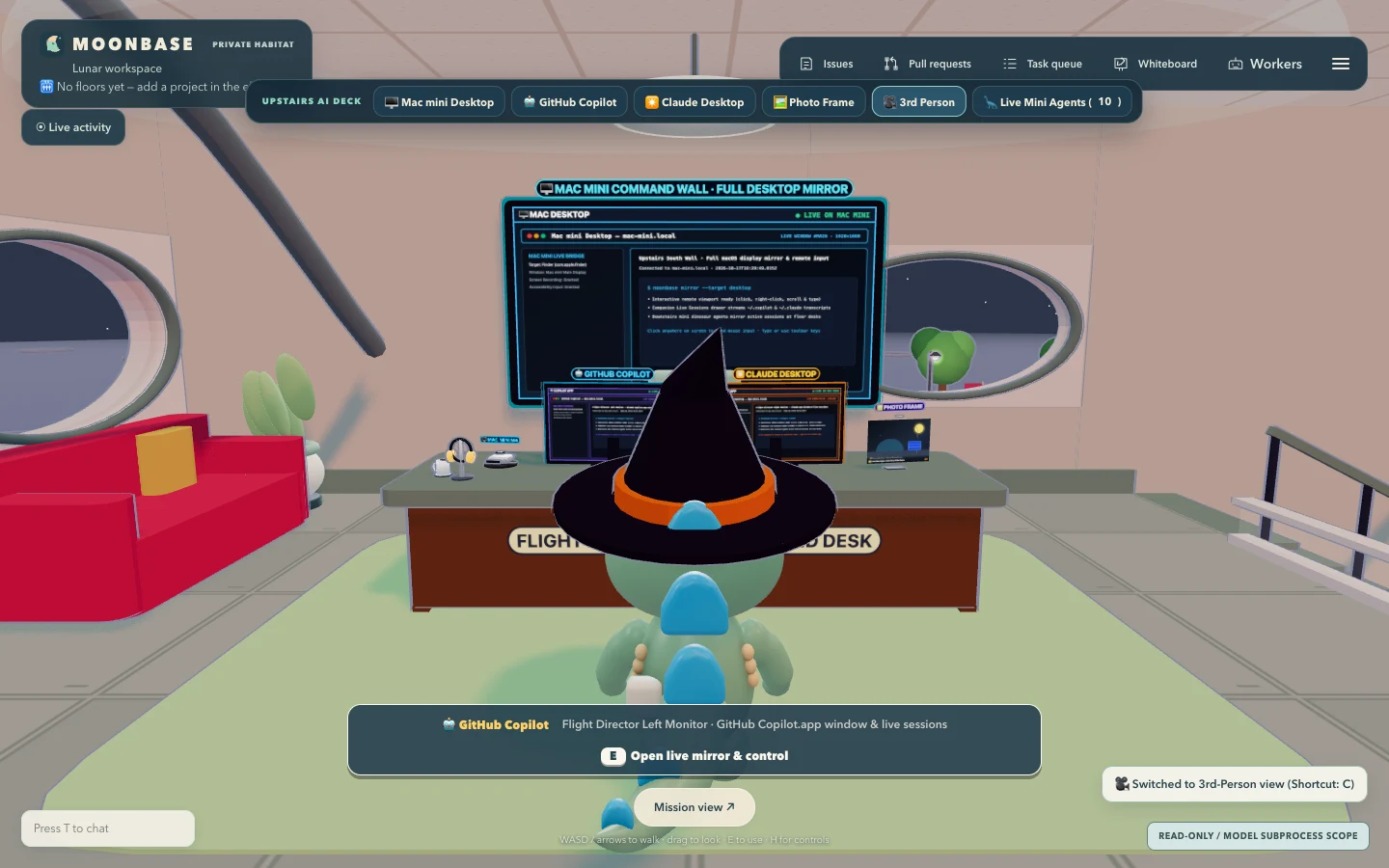
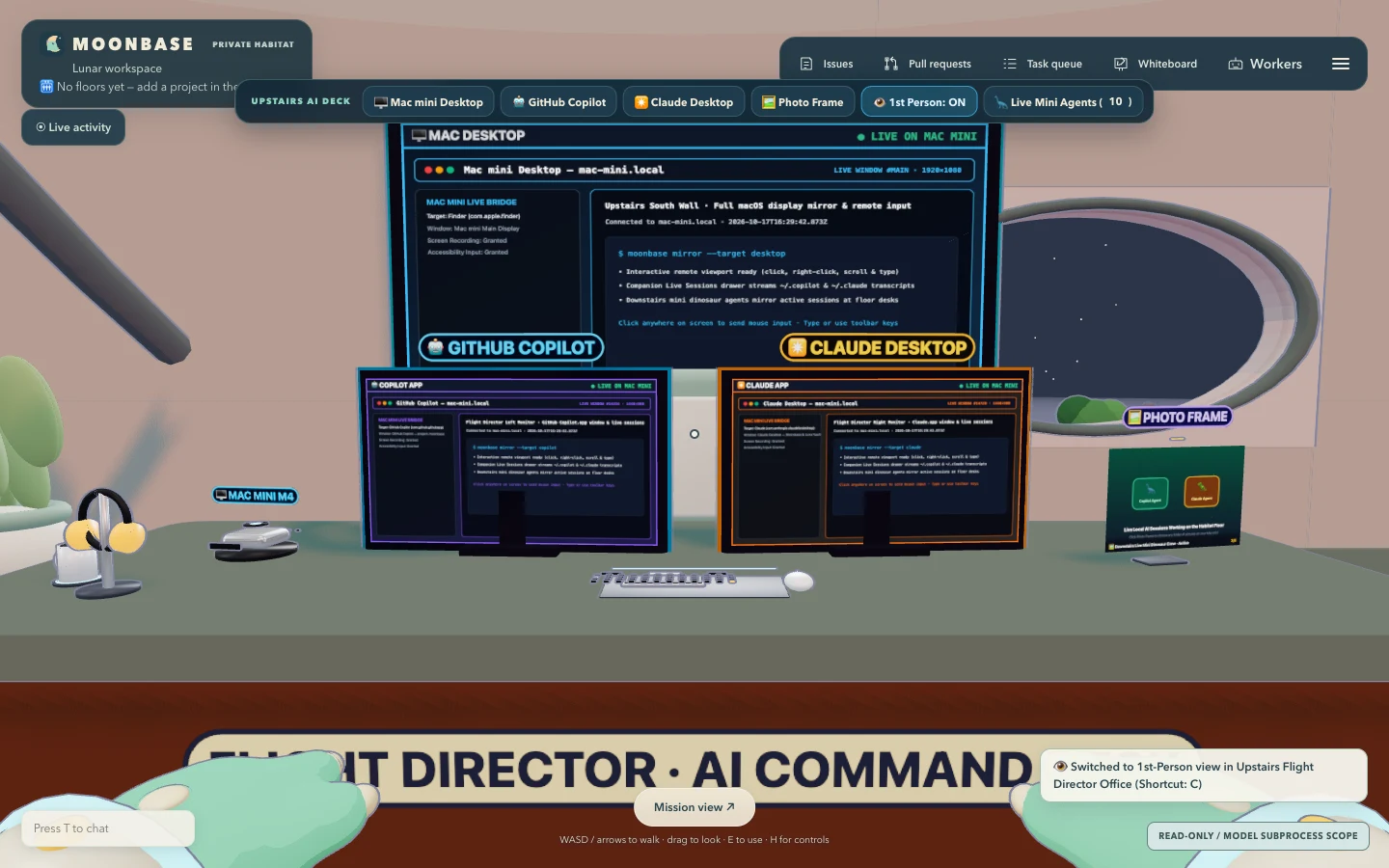
setLoftCutaway(true)), showing the centered dual monitors, desk hardware, and south-wall Mac mini Desktop display without wall occlusion. Open full size.Eye-level First-Person View and replacing the October warlockHand mesh
In src/client/main.ts, users can toggle First-Person View at any time via the 1st Person button in the top-left Command Deck bar (#deck-view-toggle) or the C keyboard shortcut:
- Camera placement and view switching: Entering the upstairs office via
goToUpstairsLoft()positions the player at(13.5, LOFT.y, 7.75)facing south (camYaw = -Math.PI,lookPitch = -0.05) and switchesplayer.setView('first'), placing the camera at eye height inside the character with the viewmodelhandsGroupattached to the camera. - Fixing the October seasonal hand bug (
src/client/world/hands.ts): The upstream Agent Office codebase contained a seasonal check (const isOctober = new Date().getMonth() === 9) that replaced the standard hand mesh throughout October withwarlockHand, a procedural claw with green skin (0x3a6b4c) and long dark-red fingernails (0x2a0a0a). Because Moonbase characters are friendly alien dinosaurs, those zombie hands looked jarring and out of place. We removed the seasonal warlock branch entirely and replacedhandsGroupwith a custom sculpted dinosaur paw asset (public/models/props/dino-paw.glb), mirrored across left and right hands with idle breathing sway, walking bob, and click-tap animations.
dino-paw.glb) and unobstructed views of all three monitors. Open full size.6. Reproducible Blender asset pipeline and Virtual Rotating Photo Frame
All five new 3D assets introduced in the loft redesign are generated deterministically by versioned Python scripts executed under Blender (4.2+):
- Sculpted Dinosaur Paws (
scripts/blender/build_dino_hands.pytopublic/models/props/dino-paw.glb,182 KB):- Guided by a Higgsfield Soul 2.0 reference study of cute plush alien-dinosaur paws, the script constructs overlapping spheres and capsules for the rounded forearm cuff, plump palm, three stubby toes, and thumb, joins them into a unified mesh, and runs Blender’s Voxel Remesh modifier (
voxel_size = 0.008,use_smooth_shade = True) followed by a Laplacian Smooth pass (iterations = 10,lambda_factor = 0.35). - Separate rounded cream belly-pad, toe-bean, ivory claw, and dorsal pastel-spot meshes are attached and exported with roughness-tuned PBR materials (
DinoTealSkin#33C7B5,DinoCreamPad#FFF3D6,DinoCuteNail#FFF9EB,DinoSpotAccent#7BE8D8).
- Guided by a Higgsfield Soul 2.0 reference study of cute plush alien-dinosaur paws, the script constructs overlapping spheres and capsules for the rounded forearm cuff, plump palm, three stubby toes, and thumb, joins them into a unified mesh, and runs Blender’s Voxel Remesh modifier (
- Flight Director Desk Hardware (
scripts/blender/build_desk_assets.py):mac-mini.glb: Rounded silver aluminum unibody enclosure with dark front port strip and glowing cyan power LED.desk-keyboard-mouse.glb: Low-profile dark mechanical keyboard with teal/purple accent keycaps and ergonomic wireless mouse on a desk mat.digital-photo-frame.glb: Brushed-metal digital photo frame with an angled stand and a dedicated screen plane (photoFrameScreen) that receives dynamicTHREE.Textureupdates at runtime.desk-companion-kit.glb: Studio headphone stand with over-ear headphones and a ceramic Moonbase coffee mug on a coaster.
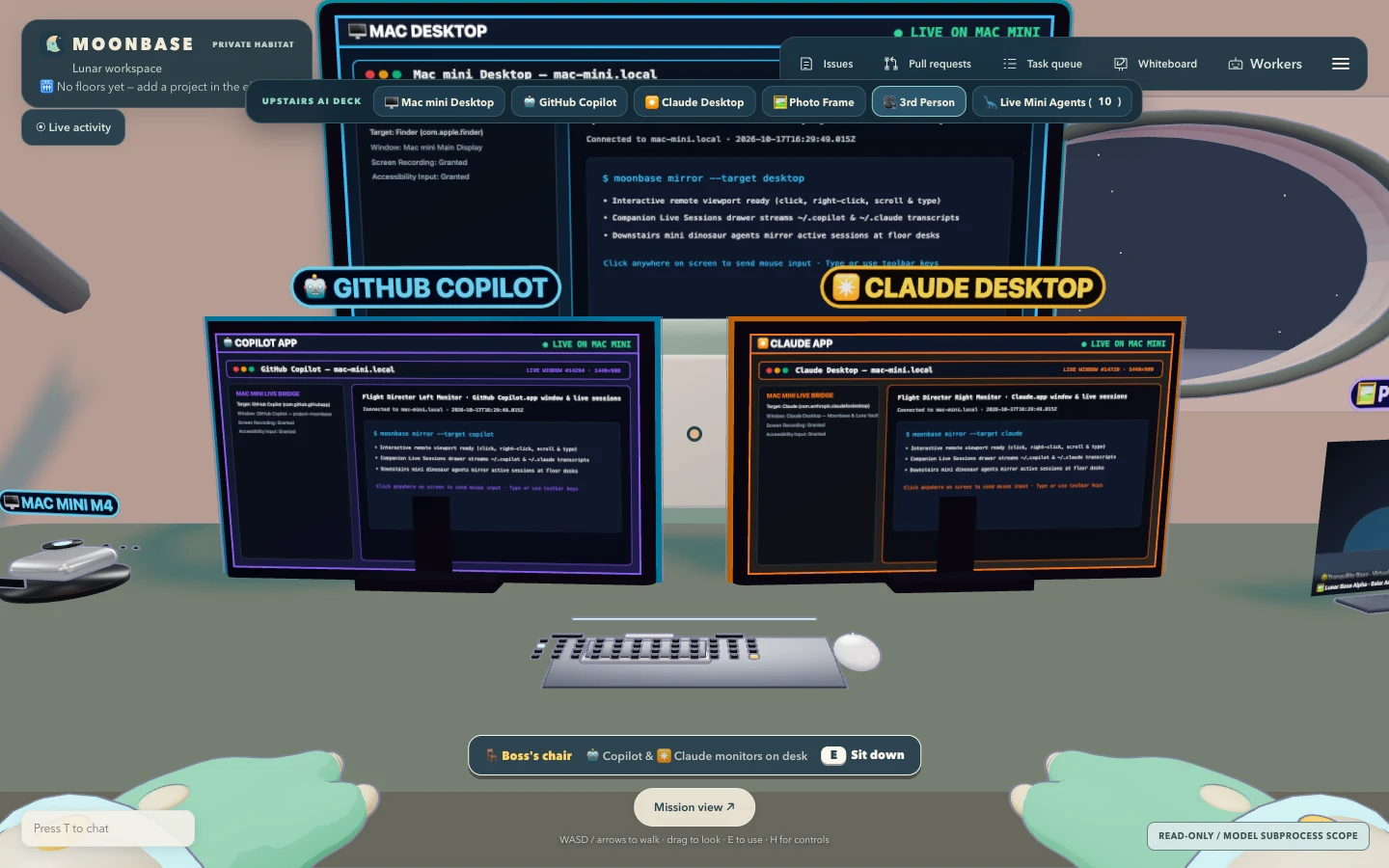
mac-mini.glb, desk-keyboard-mouse.glb, desk-companion-kit.glb, and digital-photo-frame.glb) alongside the sculpted dinosaur paws. Open full size.Virtual Rotating Photo Frame service (src/server/photo-frame.ts)
The digital photo frame on the right wing of the Flight Director desk is backed by PhotoFrameController:
- Three photo sources (
builtin,folder, andupload): Users can point the frame at any local folder on the Mac mini (POST /api/photo-frame/configwithfolderPath, plus auto-discoveredsuggestedFolderslike~/Picturesand~/Desktop), upload a folder of images directly from a remote browser (POST /api/photo-frame/upload), or use the built-in Lunar Base gallery (source: 'builtin'). Rotation interval (intervalSec,3..300s) andshuffleare persisted across restarts. - Image serving with traversal protection (
GET /api/photo-frame/image?id=<id>): Resolves the requested slide by validated item ID and restricts file extensions to.jpg,.jpeg,.png,.webp,.gif,.avif, and.svginside the configured directory. - Built-in Lunar Base gallery: Out of the box,
BUILTIN_SLIDESprovides four resolution-independent SVG illustrations (earthrise-observatory.svg,dino-crew-portrait.svg,upstairs-command-blueprint.svg,lunar-greenhouse-sunset.svg) so both the 3D desk frame and the full-screen modal (src/client/ui/photo-frame.ts) work immediately with zero configuration.
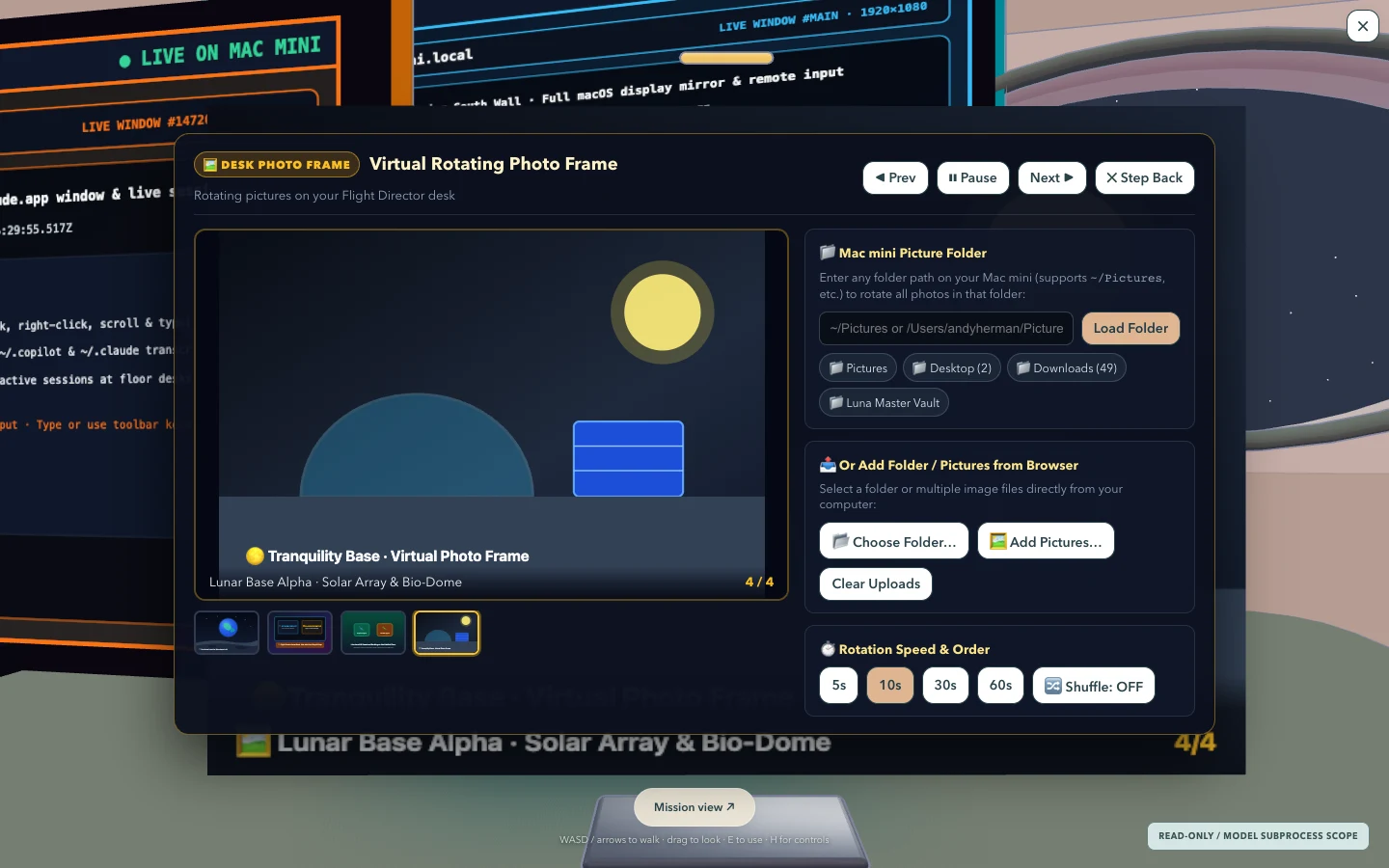
src/client/ui/photo-frame.ts), allowing the owner to switch folders on the Mac mini, upload photos, adjust rotation cadence, and step through slides. Open full size.7. Verification and live deployment status
The Upstairs Mac mini AI Command Deck, Downstairs Live Session Watcher, Expanded Loft, First-Person Dinosaur Paws, and Virtual Rotating Photo Frame were verified across 78 automated Vitest suites (189 tests), full TypeScript and Vite production builds, and end-to-end Playwright browser verification against the live Mac mini host (commits 8f9ce04 / f4b0250 in PR #20 and commit ac2f7de in PR #22).
The immutable production release (/Users/andyherman/.local/share/moonbase/releases/ac2f7de2bf44a2ccc97784deda7fff158a49f9c8) is active under launchd service dev.neural-bridge.moonbase behind Cloudflare Access at https://moonbase.neural-bridge.dev.
References
- Moonbase: Back to the Drawing Board and the Moonbase project hub.
- Moonbase Persistent Agent Workbench and its Workbench technical specification.
- Original Moonbase build and the MIT-licensed Agent Office foundation.