When you build in public, it is tempting to treat a green CI pipeline and a finished technical specification as proof that a product works. Earlier this week I shipped the Persistent Agent Workbench for Moonbase, complete with versioned specialist profiles, project workstreams, scoped knowledge grants, and a formal technical specification. Everything passed verification. Every state transition was fenced and audited.
Then I actually sat down to use it, and my honest reaction was simple: this is too hard to use, it is not very fun, there are too many steps, and I do not see any output. Back to the drawing board.
The lunar base is cool, and the original Blender alien-dinosaur characters are cute. Being able to walk around a tiny research station on the moon is a fun piece of engineering. But if nothing is actually working when I want to get real work done, how useful is it?
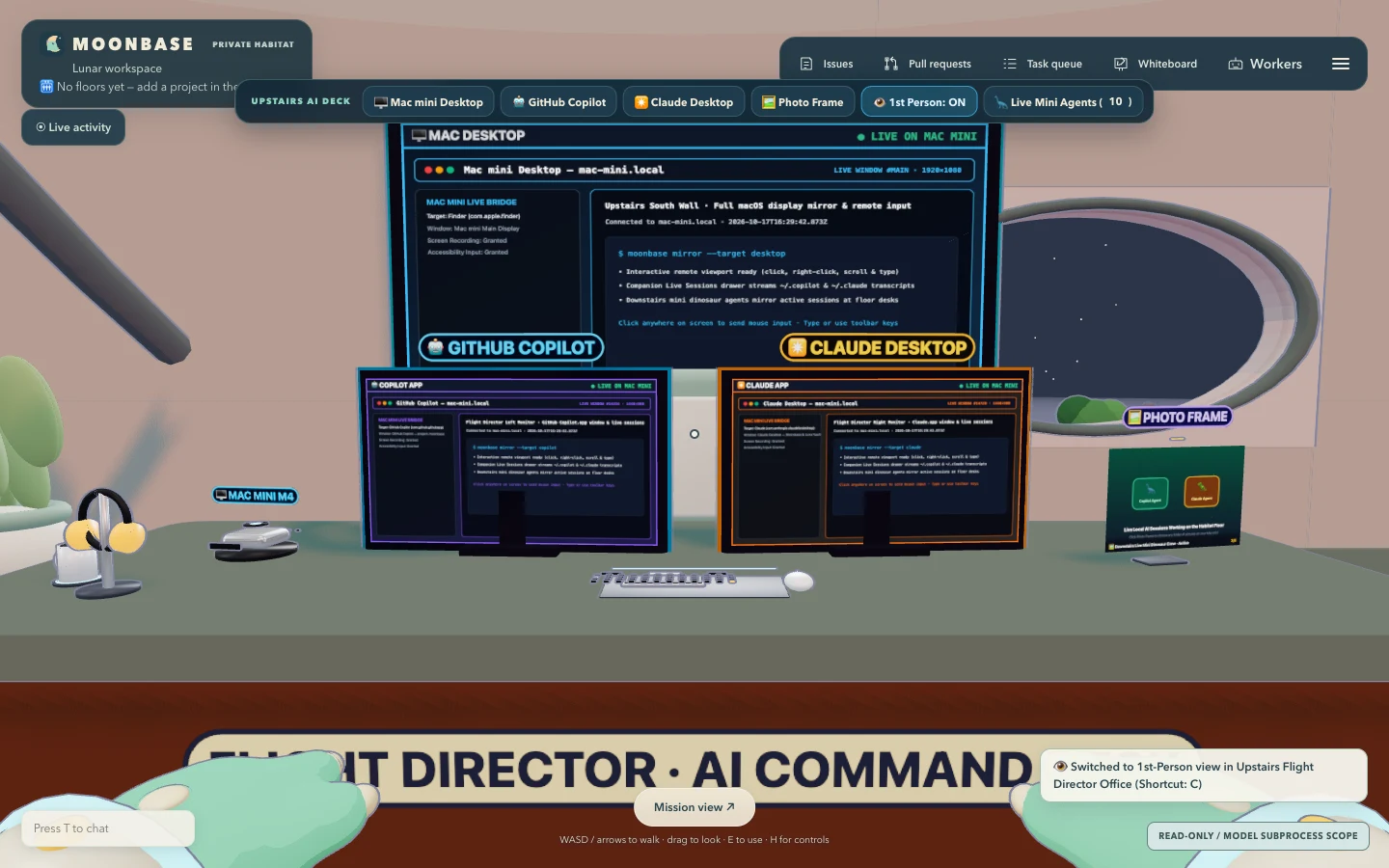
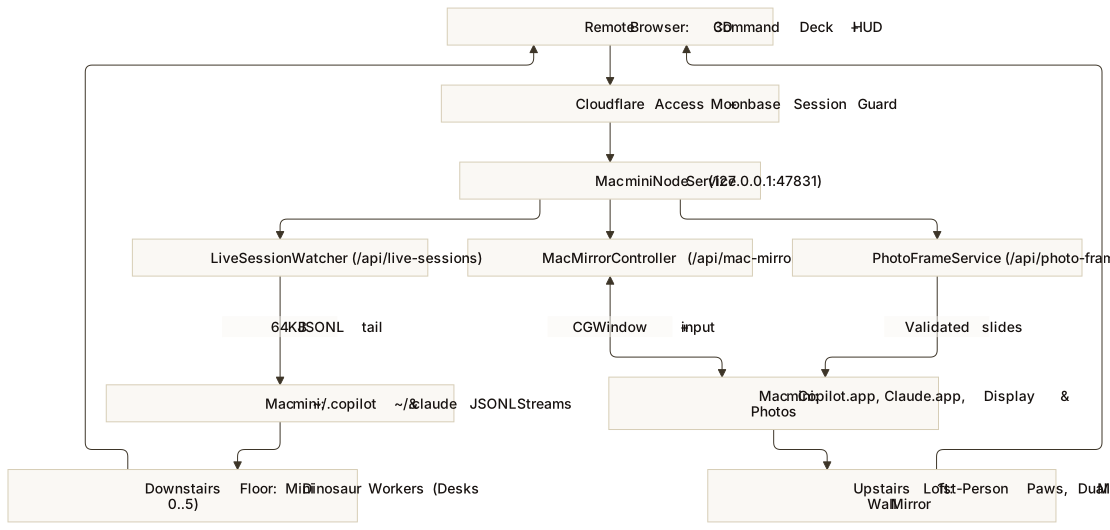
This article explains why the first two iterations missed my daily workflow and how I rebuilt Moonbase into a live remote command deck for my Mac mini. The companion architecture specification documents the screen-capture bridge, live session tailer, first-person camera physics, and procedural Blender asset pipeline in detail.
Two ways to miss the real workflow
Looking back at the first two iterations of Moonbase, each one solved an interesting technical problem while missing how I actually work every day.
The first version focused on spatial presence. I adapted Agent Office into a Three.js lunar habitat with custom Blender characters and real terminal desks, plus a read-only telemetry bridge to observe my Neural Bridge bots. It was charming, and it kept a strict boundary between real process telemetry and cartoon animation. Yet walking an avatar across a 3D room to inspect a tiny terminal is a novelty, not a workflow I reach for when I am trying to ship code or write a paper.
The second version, the Persistent Agent Workbench, swung hard in the opposite direction. To move past the 3D room, I built a 2D control plane around official SDK adapters, versioned specialist profiles, workstreams, evaluation rubrics, knowledge archives, and explicit per-run consent gates. On paper, it looked like a serious agent governance system. In practice, I had exposed the database schema as the user interface. Before I could get a single useful answer, I had to configure a workstream, bind a profile to a project, approve grants, and check readiness gates.
Worse, the SDK architecture created a fundamental disconnect with the tools I actually use. Because Anthropic’s SDK terms disallow using a consumer claude.ai subscription login inside a third-party SDK product, the Workbench’s Claude Agent SDK route sat permanently auth-blocked unless I wired up separate API billing. So when I opened my brand-new Workbench on my Mac mini, Copilot was waiting on readiness checks, Claude was blocked by SDK auth rules, every panel was empty, and I was staring at administrative forms instead of output.
Meanwhile, right behind that browser window on the exact same Mac mini, GitHub Copilot and Claude Desktop were already open, signed in, connected to my repositories and Obsidian vault, and doing all of my real work.
What I actually want from Moonbase
That contradiction made the real product goal obvious. I do not need Moonbase to be a third, isolated AI runtime with its own empty forms and shadow agent profiles. I already use GitHub Copilot and Claude Desktop for all of my work, and they live on my always-on Mac mini.
What I actually want is for Moonbase to be my virtual one-stop shop for my AI work: a single place where, through my Moonbase login (moonbase.neural-bridge.dev), I can access the GitHub Copilot and Claude Desktop running on my Mac mini from anywhere, while seeing the sub-agents I spin up reflected live on the habitat floor.
| Iteration | Core Idea | Why It Worked or Failed |
|---|---|---|
| 1. Lunar Habitat | Walkable 3D agent office with alien-dinosaur residents | Cute and creative, but 3D navigation is friction when you just want to run a task and read the output. |
| 2. Persistent Workbench | Versioned profiles, workstreams, and SDK adapters | Too many setup steps before seeing output; isolated SDK harnesses could not share my live Claude Desktop session or active Copilot state. |
| 3. Mac mini AI Command Deck (The Redo) | Authenticated remote portal to my live Mac mini GitHub Copilot, Claude Desktop, and full macOS screen | Connects directly to the tools, sessions, terminals, and vault I actually use every day, with one-click monitor zoom and first-person ergonomics. |
Designing the redo: one login to my real Mac mini tools
The irony is that Moonbase already had the hardest infrastructure pieces in place. It runs directly on my Mac mini, sits behind Cloudflare Access zero-trust authentication and a dedicated tunnel, and includes a persistent pseudoterminal host (ptyhost) that survives server restarts. The mistake was putting a wall of synthetic configuration between that login and my actual desktop tools.
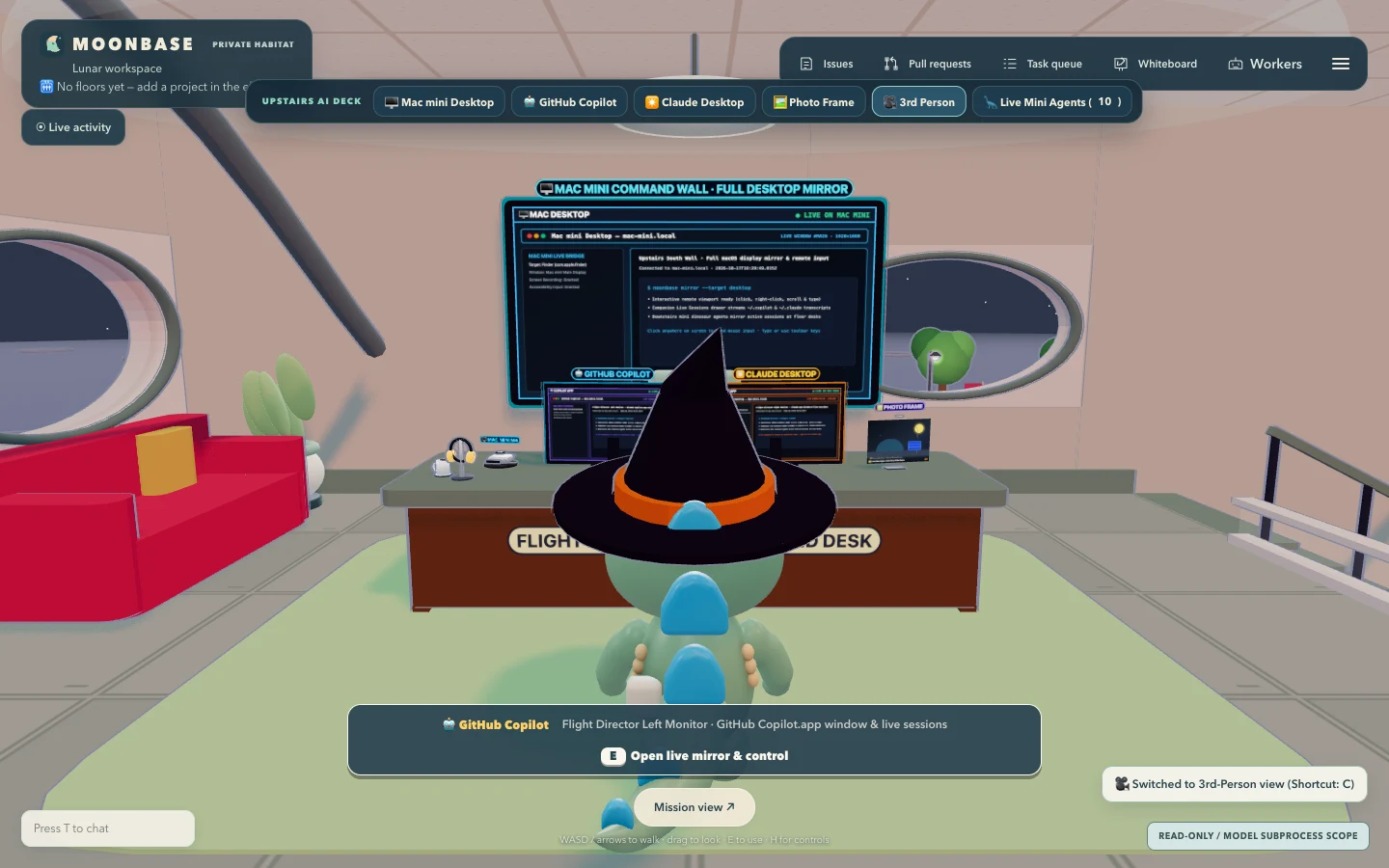
Rebuilding Moonbase around how I actually work required rethinking both the upstairs Flight Director office and the downstairs main floor.
1. Expanding the Upstairs Flight Director Office and Switching to First-Person View
Moonbase has an upstairs glass-walled loft (FLIGHT DIRECTOR) in the south-east corner overlooking the main floor. In the original Agent Office layout, sitting at that upstairs desk zoomed the camera into a single monitor to play Minesweeper, and the 8m x 5m loft felt cramped because the surrounding walls occluded much of the screen in third-person orbit camera mode.
To make the upstairs office a space I actually want to sit in and use every day, I made four changes to the room and camera physics:
- Expanded loft footprint and dynamic wall cutaway: The upstairs office expanded from
8m x 5m(height: 2.5m) to a spacious9.0m x 7.2m x 3.3mcommand deck (x: 9..18,z: 5.8..13,y: 3.0). Whenever the player is upstairs,setLoftCutaway(true)automatically hides the upper north and west loft glass enclosure (loftUpperEnclosure) so walls and banners never block the monitors. - First-Person View with sculpted dinosaur paws: Clicking
1st Personin the top-left command deck (or pressingC) switches the camera to eye level inside the character’s head with pointer-lock mouse look. An amusing bug surfaced during testing: Agent Office had a hardcoded seasonal check (new Date().getMonth() === 9) that swapped the first-person hands in October to green zombie claws with dark-red fingernails (warlockHand). I replaced that seasonal mesh with a custom Blender-sculpteddino-paw.glbasset built with voxel remeshing (voxel_size = 0.008) and Laplacian smoothing so the first-person view shows friendly three-toed teal dinosaur paws with warm cream belly pads and rounded stubby claws. - Centered Dual AI App Monitors on the Asset Desk: The
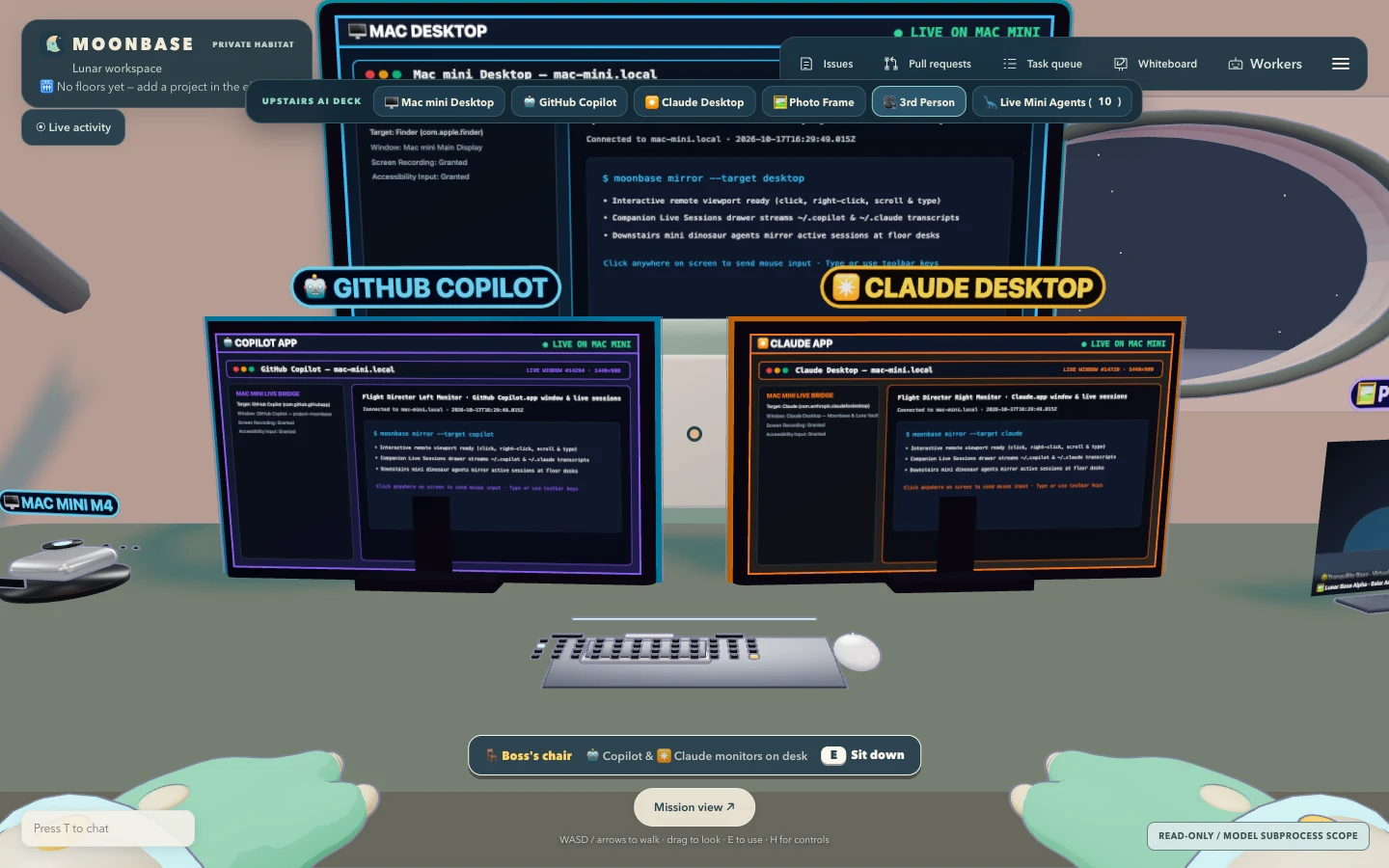
3.8m-wide executive desk (deskX = 13.5,deskZ = 10.15) now centersGitHub Copiloton the left (x = +0.56when facing south) andClaude Desktopon the right (x = -0.56), angled slightly inward toward the chair. Between and beside them sit four new procedural Blender GLB props: a silver aluminumMac mini M4(mac-mini.glb) with front power LED, a dark mechanicalDesk Keyboard & Mouse(desk-keyboard-mouse.glb), aDesk Companion Kit(desk-companion-kit.glb) with a headphone stand and ceramic mug, and aDigital Photo Frame(digital-photo-frame.glb). - A Huge Wall Monitor for the Full Mac mini Desktop: Mounted on the south wall behind the desk (
x = 13.5,z = 12.92) is a3.66m x 1.98mdisplay that mirrors the entire Mac mini desktop. Clicking any of the three monitors (either in 3D or from the persistent top-left Command Deck bar) opens an interactive live screen modal with click forwarding, text input, window activation, and one-clickStep Backinto the loft.
2. A Virtual Rotating Photo Frame on the Desk
A workspace only feels like home when it has personal touches. On the right side of the Flight Director desk sits a 3D digital photo frame (digital-photo-frame.glb) whose screen texture cross-fades through a live slideshow right inside the Three.js scene.
Clicking the photo frame on the desk (or clicking Photo Frame in the top-left HUD) opens the Virtual Photo Frame modal:
- Point it at any local photo folder or upload from the browser: You can enter any directory on the Mac mini (defaulting to
~/.moonbase/photos, with one-click presets for~/Picturesand~/Desktop), upload a folder directly from your browser, and configure the rotation speed from3sto300s. - Zero-config Lunar Base gallery out of the box: When no custom folder is active, the server provides four high-resolution Lunar Base SVG slides so the frame is immediately alive on the desk and ready to swap to personal photos at any time.
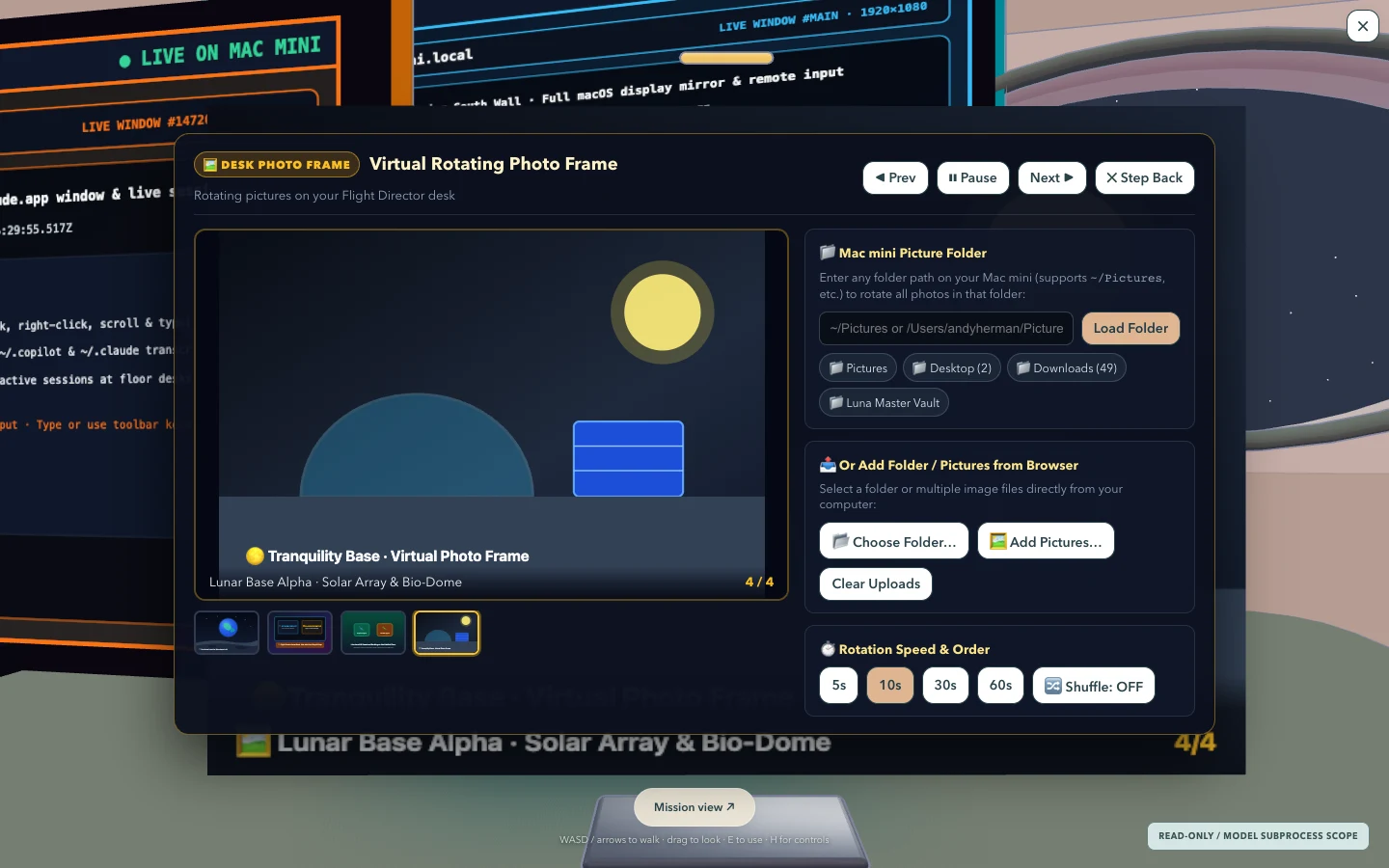
/api/photo-frame), showing the active slide preview, folder path selector, quick presets, rotation interval controls, and thumbnail strip. Open full size.3. Zoomed App Mirrors and Downstairs Live Session Mini Dinosaur Agents
Clicking either desk monitor or the south-wall screen zooms straight into the upstairs monitor modal (src/server/mac-mirror.ts). When the target desktop application window is open on screen on the Mac mini, Moonbase captures the live window or display via macOS screencapture and CGWindowListCopyWindowInfo and streams it to the browser with remote click and keyboard forwarding. When a window is minimized or occluded (< 50 KB backing store), it cleanly falls back to a live status card with a Bring to Front on Mac mini action.
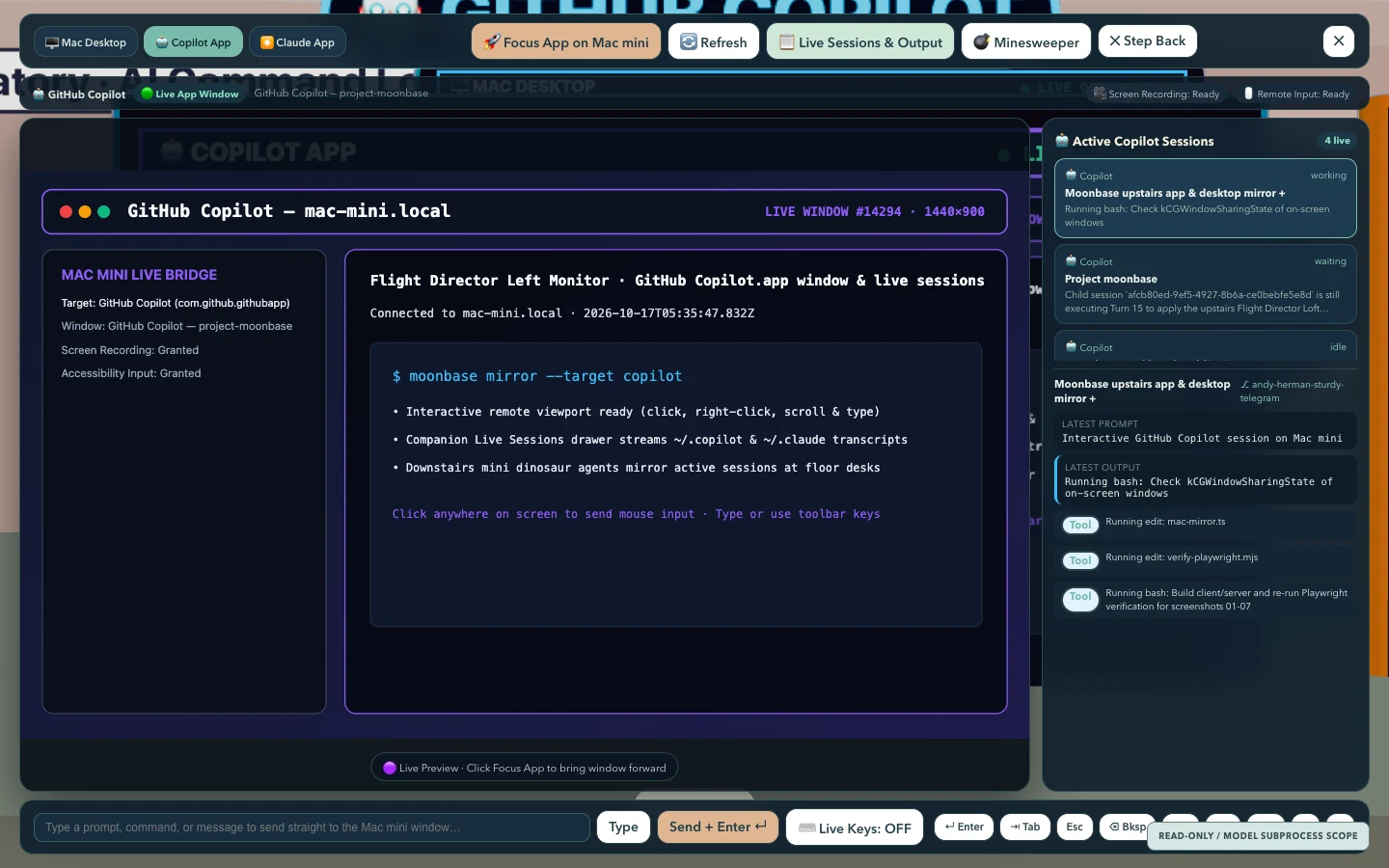
Meanwhile, looking down through the loft glass onto the main floor, the mini dinosaur agents are no longer decorative stand-ins. A non-intrusive LiveSessionWatcher (src/server/live-session-watcher.ts) tails ~/.copilot/session-state/ and ~/.claude/projects/ JSONL event streams in real time without spawning extra CLI processes or consuming API tokens:
- Automatic desk assignment: Up to six active or recent GitHub Copilot and Claude sessions claim desks
0..5on the downstairs floor, displaying the session name, repository, branch, and live status badge (working,waiting, oridle). - Live output inspection: Clicking any mini dinosaur worker downstairs (or selecting a session pill in the top-left Command Deck bar) opens a live session modal showing the latest assistant response, active tool calls, and a one-click jump to the parent app monitor upstairs.
The lesson
It is easy to fall in love with architectural ceremony: versioned schemas, multi-step approval queues, and isolated SDK wrappers, because every piece feels like engineering progress. Build enough scaffolding, and you can convince yourself you have built a product even when opening the app gives you zero output.
The real test for a personal AI workspace is much simpler: when I log in from my laptop or tablet, can I immediately see and drive the GitHub Copilot and Claude Desktop work already happening on my Mac mini, in an office that actually feels good to use? Stripping away the ceremony, expanding the upstairs Flight Director loft, adding first-person view with cute dinosaur paws, and wiring the monitors and downstairs mini agents directly to my live Mac mini finally turned Moonbase into a tool I want to keep open every day.